Presenting at an Exhibition
Setup
- If possible, check out the space in advance. Evaluate:
- Siting. Find out where your project will be situated.
- Seating. Does the viewer need to sit while interacting with your project? Is the project at the correct height? Have you provided a chair?
- Standing. Does the viewer need to stand up? Is your project at the right height for this?
- Bystanding. Is there room for other people to watch the interaction? If it is important that they see the same thing as the interactor (screens, or anything else), is this possible?
- Projector. Do you need a projector? If so, where will it be situated?
- Lighting. Will the room lights be on or off? Is your laptop or projector screen exposed to indirect or direct sunlight; if so, is it visible in these circumstances? When someone uses your project, will there be direct sunlight or spotlights (say, from other projects) shining in their eyes?
- Sound. Does your project require quiet? Is it sited in a place where this can happen? If not, how will you work around this?
- Arrive early. Set up and test your project, then wander around. Check back before the show to see whether people have moved your project, or set up obnoxious projects next to it.
- Create a setup checklist. List everything to bring and every step required to start the project. Test the checklist in advance. Move the project, reboot the computer, restart Processing and any other software, and verify that the project still works.
- Create a Test Script. This is part of your Setup Script. List the checks that verify your project is set up correctly and working. Test whether any lighting, sound, or distance sensors work in the new environment.
- Create an Introduction Script. Does your project require that you introduce it to each new viewer? Whether it does or not, write out what you will say to visitors. (Then you can throw away what you wrote down. The point is to figure it out in advance, not to read from the same script each time.) Pay attention to these points:
- Do not apologize. Do not explain why you didn’t finish or what didn’t work. At least not initially. After the visitor has interacted with the project, then you can discuss the process and details.
- Talk about vision and interaction, not about sensors and code. At least initially. After the visitor has interacted with the project and you have explained your vision, you can discuss technical details if they are interested.
- Prepare for contingencies
- Buy two of everything. If a cable, sensor, or board fails during the show, you can replace it only if you brought a spare.
- Bring tools. Usually you want tape and wire.
- Prepare fallback modes. Make each component able to do something when another component fails. For example, if Processing visuals require a sensor value, add a key or configuration line that runs them without the sensor. This mode can also help you test components independently.
Full Screen Mode
In Processing, present your project using Present (⇧⌘R), not Run (⌘R).
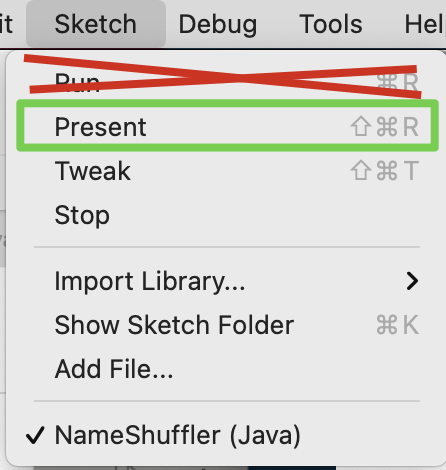
You can also hold down the Shift key while pressing the Play (“Debug”) button to Present instead of Run.

If your sketch uses fullScreen() instead of size(), you do not need to do this.
©2020–2022 by Oliver Steele.